
Team
The workspace members and their roles: who can view, who can operate, who administers.
Key points
- Assign the minimum role needed: viewer for those who only need to look, editor for those who operate, admin only for those who configure.
- Check pending invitations: an unaccepted invitation can be removed and sent again.
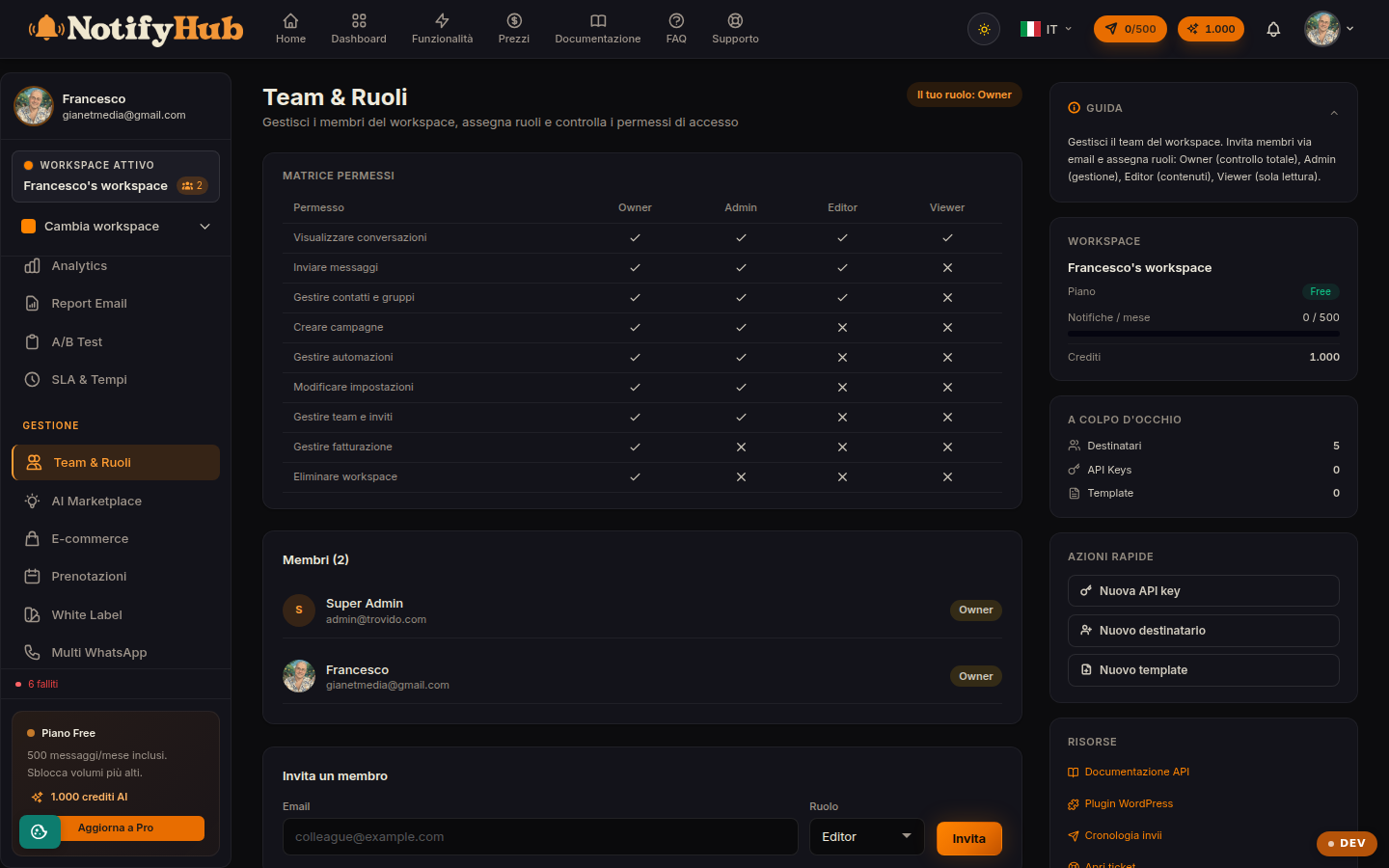
- Consult the permissions matrix on the page to know exactly what each role can do.
What this page is for
The Team page manages who works in the workspace. The list shows the members with their role and the invitations awaiting acceptance; the permissions table explains what each role allows: conversations, sends, campaigns, automations, recipients, settings, billing, team management and workspace deletion.
Inviting and managing members
With the invitation form you enter the email and choose the role: the person receives an invitation and appears among the "pending" until they accept. On existing members you can change the role or remove them from the workspace. This section is restricted to administrators.
The four roles
Viewer has read-only access (dashboard, conversations, analytics); editor operates on content (replies, creates campaigns and automations, manages contacts); admin configures the workspace (API keys, webhooks, settings, team); owner has full control, including billing and workspace deletion. The principle is least privilege: raise a role only when it is truly needed.