
Conversations
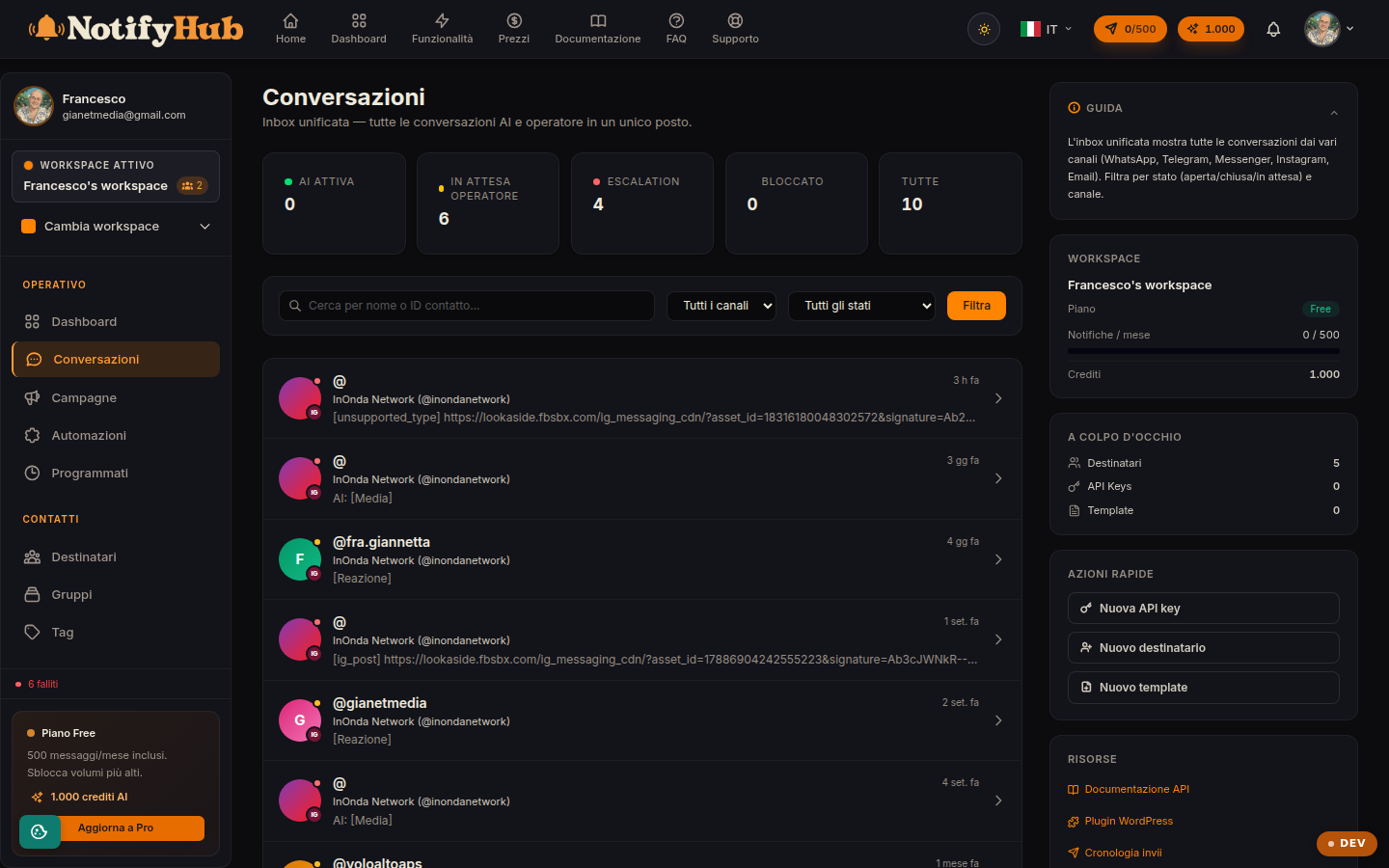
The unified inbox: every customer chat, on any channel, handled by AI and agents in one place.
Key points
- Use the channel and status filters to focus on the conversations that need a human touch.
- Type / in the composer to insert a quick reply without rewriting it every time.
- If you took over a chat handled by the AI, remember to reactivate the assistant when you are done.
What this page is for
Conversations gathers in a single inbox the messages coming in from all connected channels (WhatsApp, Telegram, Instagram, Messenger, email, the site widget and more). Each conversation shows its source channel, the latest message and the status, so the team works from one screen instead of jumping between apps.
How to use it
Search by name or content, filter by channel or status and open the conversation to read the full history and reply. In the composer you can attach media and call up quick replies by typing /. The conversation status (open, pending, resolved) is updated from the detail view and keeps the team's work queue tidy.
AI and agent handoff
If the AI assistant is enabled on the workspace, it replies automatically using the Knowledge Base and the configuration defined in the workspace settings. When an agent steps in, the AI pauses on that conversation: the "reactivate AI" button puts it back to work. Handoff keywords configured in the settings automatically hand the chat over to a human.